
Neve Pro WordPress Theme Guide – Popular Theme
If you’re looking for a fast, flexible, and modern WordPress theme, the Neve Pro WordPress theme might be exactly what you need. This comprehensive Neve WordPress theme review will walk you through everything you need to know about this popular theme that’s been making waves in the WordPress community.
Neve Pro Theme For WordPress
Get the Premium Neve Pro Theme
What is Neve Pro WordPress Theme?
The Neve WordPress theme is a lightweight, multipurpose WordPress theme developed by Themeisle. The Neve theme Pro version takes the free version to the next level with advanced features and premium functionality. Built with speed and flexibility in mind, this theme works perfectly with popular page builders like Elementor, Beaver Builder, and Gutenberg.
The WordPress Neve theme follows modern web standards and is designed to load quickly while offering extensive customization options. Whether you’re building a business website, blog, portfolio, or online store, the WP Neve theme provides the foundation you need.
Why Choose Neve Over Other Themes?
The WordPress theme never stands out for several reasons:
- Lightning-fast loading times – Often loads in under 1 second
- Mobile-first design approach ensures perfect display on all devices
- SEO-optimized structure helps improve search engine rankings
- Easy customization without coding knowledge required
- Regular updates and excellent customer support
Key Features of WordPress Neve Theme
Performance Optimization
TheNeve Proo theme is built with performance as a top priority. The theme’s codebase is clean and minimal, which means:
- Small file sizes that load quickly
- Optimized CSS and JavaScript delivery
- Lazy loading for images and content
- Compatibility with caching plugins
- CDN-ready structure for global content delivery
Design Flexibility
One of the strongest points in any new theme review is its design flexibility:
Header Options:
- Multiple header layouts
- Custom logo placement
- Navigation menu styles
- Contact information display
- Social media integration
Layout Controls:
- Sidebar positioning
- Container width settings
- Content spacing adjustments
- Color scheme customization
- Typography controls
Footer Customization:
- Multi-column footer layouts
- Widget-ready areas
- Copyright and legal information
- Additional navigation menus
E-commerce Integration
The WordPress Neve theme works seamlessly with WooCommerce:
- Product page layouts that convert visitors to customers
- Shopping cart integration with a smooth checkout process
- Product gallery options with zoom and lightbox features
- Mobile-optimized shopping experience
- Payment gateway compatibility with all major providers
Neve WordPress Theme Review – Pros and Cons
Advantages of Neve Pro WordPress Theme
Speed and Performance:
The Neve Pro WordPress theme consistently scores high on speed tests. Most websites built with this theme achieve Google PageSpeed scores above 90, which is excellent for both user experience and SEO rankings.
User-Friendly Interface:
Even beginners find the WordPress Neve theme tutorial easy to follow. The theme customizer is intuitive, and most changes can be previewed in real-time.
Page Builder Compatibility:
Unlike many themes that conflict with page builders, the WP Neve theme works smoothly with:
- Elementor Pro
- Beaver Builder
- Brizy
- Visual Composer
- Divi Builder
Regular Updates:
Themeisle provides consistent updates that add new features and maintain compatibility with the latest WordPress versions.
Potential Drawbacks
Limited Free Version:
While the free version is functional, many advanced features require the Neve theme pro upgrade.
Learning Curve for Advanced Features:
Some premium features may require time to master, especially for complete beginners.
Dependency on Page Builders:
To fully utilize the theme’s potential, you’ll likely need a page builder plugin, which adds to the overall cost.
Getting Started with Neve WordPress Theme Tutorial
Installation Process
Step 1: Purchase and Download
Visit the official Themeisle website and purchase the Neve Pro theme. Download the theme files to your computer.
Step 2: Upload to WordPress
- Log in to your WordPress admin panel
- Navigate to Appearance > Themes
- Click “Add New” then “Upload Them.e”
- Select the Neve Pro ZIP file
- Click “Install Now” and then “Activate.”
Step 3: Initial Setup
After activation, the WordPress Neve theme will prompt you to install recommended plugins and import demo content.
Basic Configuration
Customizer Settings:
Access the WordPress Customizer (Appearance > Customize) to begin personalizing your site:
Site Identity:
- Upload your logo
- Set site title and tagline
- Choose site icon (favicon)
- Configure site colors
Layout Settings:
- Select container width
- Choose sidebar positions
- Set content spacing
- Configure mobile layouts
Typography:
- Select font families for headings and body text
- Adjust font sizes and weights
- Set line heights and letter spacing
- Configure responsive typography
WordPress Neve Theme Tutorial for Beginners
Creating Your First Page:
- Go to Pages > Add New
- Choose your preferred page builder or use Gutenberg
- Select from available Neve WordPress theme templates
- Customize content, images, and layout
- Preview and publish your page
Setting Up Navigation Menus:
- Navigate to Appearance > Menus
- Create a new menu or edit existing ones
- Add pages, posts, categories, and custom links
- Assign the menu to the header location
- Configure mobile menu settings
Configuring Footer:
- Go to Appearance > Widgets
- Add widgets to footer areas
- Configure footer layout in Customizer
- Add copyright information and links
- Test the footer display on different devices
Customization Options in WP Neve Theme
Header Customization
The Neve Pro WordPress theme offers extensive header customization options:
Layout Options:
- Top bar for contact information and social links
- Main navigation with dropdown menu support
- Mobile menu with hamburger icon or custom styling
- Sticky header that follows users while scrolling
Branding Elements:
- Logo upload and positioning
- Site title and tagline display options
- Color scheme coordination
- Font selection for navigation items
Content Styling
Blog Layouts:
The WordPress theme never provides multiple blog display options:
- Grid layouts for visual appeal
- List view for traditional blog appearance
- Masonry style for varied content lengths
- Card layouts with shadows and borders
Single Post Styling:
- Author bio display
- Related posts suggestions
- Social sharing buttons
- Comment section customization
Color and Typography
Color Schemes:
- Primary color selection affects buttons, links, and accents
- Secondary colors for backgrounds and borders
- Text colors with contrast optimization
- Custom color palettes for brand consistency
Font Management:
- Google Fonts integration with hundreds of options
- Font pairing suggestions for headings and body text
- Responsive font sizing for different screen sizes
- Custom font uploads for unique branding
Performance and Speed Analysis

Core Web Vitals Optimization
The new theme pro is specifically designed to excel in Google’s Core Web Vitals:
Largest Contentful Paint (LCP):
- Optimized image loading
- Efficient CSS delivery
- Minimal render-blocking resources
First Input Delay (FID):
- Lightweight JavaScript execution
- Optimized event handling
- Smooth user interactions
Cumulative Layout Shift (CLS):
- Stable layout structure
- Proper image dimension handling
- Consistent loading behavior
Real-World Performance Tests
Independent tests of the WordPress Neve theme show:
- Average loading time: 0.8-1.2 seconds
- PageSpeed Insights scores: 90+ for both mobile and desktop
- GTmetrix grades: Consistently A or B ratings
- Pingdom results: Load times under 1 second from most locations
Optimization Best Practices
To maximize the WP NeveTheme performance:
Image Optimization:
- Use WebP format when possible
- Implement proper image compression
- Set correct image dimensions
- Enable lazy loading for below-fold content
Caching Configuration:
- Install caching plugins like WP Rocket or W3 Total Cache
- Enable browser caching
- Use CDN services for global content delivery
- Optimize database queries
Pricing and Plans
Neve Pro Pricing Structure
The Neve Pro WordPress theme offers several pricing tiers:
Personal License – $69/year:
- Use on 1 website
- Premium support for 1 year
- Access to all Pro features
- Regular theme updates
Business License – $99/year:
- Use on 3 websites
- Priority support
- White-label options
- Advanced customization features
Agency License – $199/year:
- Unlimited website usage
- Extended support period
- Client management tools
- Bulk installation options
Value Comparison
When compared to other premium themes, the Neve theme review shows excellent value:
- Lower cost than many competitors
- More features are included in the base package
- Better performance out of the box
- Active development with regular updates
Comparison with Other WordPress Themes
Neve vs Astra
Performance:
Both themes are fast, but WordPress often edges out Astra in loading speed tests.
Customization:
Astra offers more customization options in the free version, while the Neve Pro theme requires an upgrade for advanced features.
Page Builder Support:
Both themes work well with popular page builders, with similar compatibility levels.
Neve vs GeneratePress
Learning Curve:
GeneratePress has a steeper learning curve, while WordPress themes are more beginner-friendly.
Feature Set:
GeneratePress offers more developer-oriented features, while Neve focuses on user-friendly design options.
Community Support:
Both have active communities, but GeneratePress has been around longer with more third-party resources.
Neve vs OceanWP
Free Version Features:
OceanWP offers more features in the free version compared to the basic Neve WordPress theme.
Performance:
WP Neve theme typically loads faster due to a cleaner codebase.
Design Options:
OceanWP provides more pre-built demos, while Neve focuses on customization flexibility.
Best Practices for Using WordPress Neve

Site Planning and Structure
Before diving into the WordPress Neve theme tutorial, plan your site structure:
Content Hierarchy:
- Define main navigation categories
- Plan page relationships and linking
- Consider user journey and conversion paths
- Organize content for SEO benefits
Design Consistency:
- Choose a color palette before customization
- Select font combinations early
- Plan image styles and treatments
- Maintain consistent spacing and layouts
SEO Optimization
The Neve Pro WordPress theme is SEO-friendly, but you can enhance it further:
Technical SEO:
- Configure proper heading structure (H1, H2, H3)
- Optimize meta titles and descriptions
- Set up XML sitemaps
- Implement schema markup
Content Optimization:
- Focus on user intent and valuable content
- Optimize images with alt text and proper filenames
- Create internal linking strategies
- Monitor page loading speeds regularly
Mobile Optimization
Since WordPress is not mobile-first, ensure an optimal mobile experience:
Responsive Testing:
- Test on multiple device sizes
- Check touch target sizes
- Verify mobile menu functionality
- Ensure readable font sizes
Mobile Performance:
- Optimize images for mobile viewing
- Minimize mobile-specific loading issues
- Test mobile page speed separately
- Consider mobile-specific design elements
Common Issues and Solutions
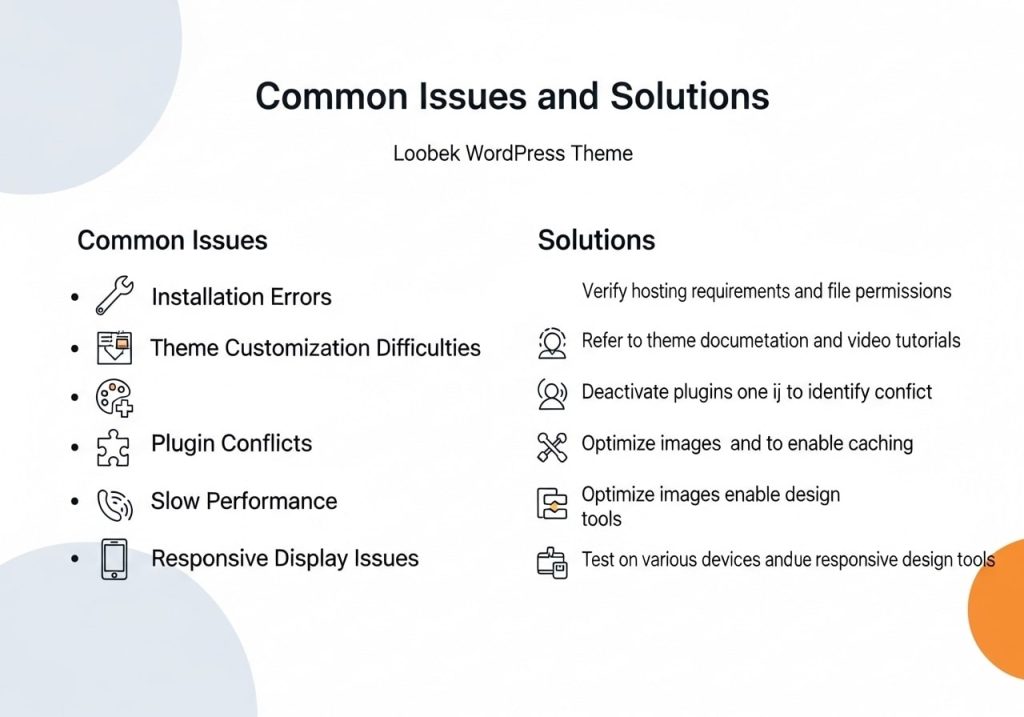
Installation and Setup Problems
Theme Not Installing:
- Check file size limits on your hosting
- Verify WordPress version compatibility
- Ensure sufficient disk space
- Try manual FTP installation
Missing Features:
- Confirm you’re using the Pro version
- Check plugin requirements
- Update to the latest theme version
- Clear caching plugins
Customization Challenges
Changes Not Appearing:
- Clear browser cache
- Disable caching plugins temporarily
- Check the theme customizer vs. the page builder settings
- Verify changes are published, not just saved
Layout Issues:
- Check container width settings
- Verify sidebar configurations
- Review responsive breakpoint settings
- Test with the default WordPress theme
Performance Troubleshooting
Slow Loading Times:
- Audit installed plugins
- Optimize image sizes and formats
- Check the hosting server performance
- Review theme customization complexity
Mobile Performance Issues:
- Test mobile-specific optimizations
- Check mobile image loading
- Verify mobile menu functionality
- Review mobile font loading
The Neve Pro WordPress theme offers an excellent balance of performance, flexibility, and ease of use. Whether you’re building your first website or your hundredth, this theme provides the tools and features needed to create professional, fast-loading sites. With regular updates, excellent support, and growing community resources, the WordPress Neve theme continues to be a smart choice for WordPress users at all skill levels.
Remember to take advantage of the extensive customization options, focus on site performance, and follow SEO best practices to get the most out of your Neve theme pro investment. The theme’s flexibility means your site can grow and evolve with your needs while maintaining excellent performance and user experience.
Ready to get started with Neve Pro? Visit the official Themeisle website to purchase your license and begin building your dream website today. Join thousands of satisfied users who have chosen the WP Neve theme for their WordPress projects.