
Avada WordPress Theme Review – Know About ThemeForest’s Best-Selling Template
The Avada WordPress theme has dominated the ThemeForest marketplace for over a decade, earning its reputation as the best-selling WordPress theme of all time. With millions of downloads and countless websites built using this responsive multi-purpose WordPress theme, Avada continues to be a top choice for beginners and professionals alike.
Avada Theme For WordPress
Get the Premium Avada Theme

What is the Avada WordPress Theme?
The Avada WordPress theme is a comprehensive, multi-purpose template designed to work for virtually any type of website. Created by ThemeFusion, this ThemeForest Avada WordPress theme offers an all-in-one solution that eliminates the need for multiple plugins and complex coding.
What is the Avada theme exactly? It’s a premium WordPress theme that combines powerful features with user-friendly design tools. The theme includes a built-in page builder called Fusion Builder, extensive customization options, and over 60 pre-built website templates.
Key characteristics of the Avada theme for WordPress include:
- Fully responsive design that works on all devices
- Drag-and-drop page builder functionality
- Extensive customization options
- Regular updates and new features
- Comprehensive support system
- WooCommerce compatibility
- SEO optimization features
Avada Theme Features and Capabilities
The latest version of the Avada theme (currently Avada 7.9.2) comes packed with features that make website building accessible to users of all skill levels.
Core Features
- Fusion Builder Integration: The heart of the Avada WordPress theme is its built-in Fusion Builder. This drag-and-drop page builder allows users to create complex layouts without touching a line of code. The builder includes both front-end and back-end editing capabilities.
- Pre-built Website Templates: The theme includes over 60 Avada prebuilt websites covering various industries and niches. These templates serve as excellent starting points for new projects.
- Header and Footer Builder: Users can create custom headers and footers using the same drag-and-drop interface, providing complete control over their website’s appearance.
- Advanced Typography Options: The theme includes extensive typography controls, supporting Google Fonts and custom font uploads.
Design Elements
The Avada responsive multi-purpose WordPress theme includes hundreds of design elements:
- Buttons and call-to-action elements
- Image galleries and sliders
- Portfolio layouts
- Blog post templates
- Contact forms
- Pricing tables
- Testimonial sections
- Team member profiles
Performance Features
Modern versions like Avada 7.7 and beyond focus heavily on performance optimization:
- Lazy loading for images and elements
- Optimized code structure
- Caching compatibility
- Mobile-first design approach
- Fast loading times
Avada WordPress Theme Pricing and Versions
The Avada theme price on ThemeForest follows a straightforward pricing structure. As a premium theme, the Avada theme’s free versions are not officially available, though the investment provides significant value.
Current Pricing Structure
- Regular License: $60 (for single website use)
- Extended License: $300 (for client projects and multiple sites)
The license includes:
- Theme files and documentation
- 6 months of support
- Lifetime updates
- Access to all pre-built websites
- Fusion Builder page builder
Version History
The Avada theme’s latest version represents years of continuous development:
- Avada 7.2.1: Introduced enhanced mobile responsiveness
- Avada v7.3: Added new design elements and improved performance
- Avada 7.7: Focus on speed optimization and new templates
- Avada 7.9.2: Latest stability improvements and feature additions
How to Install Avada Theme on WordPress
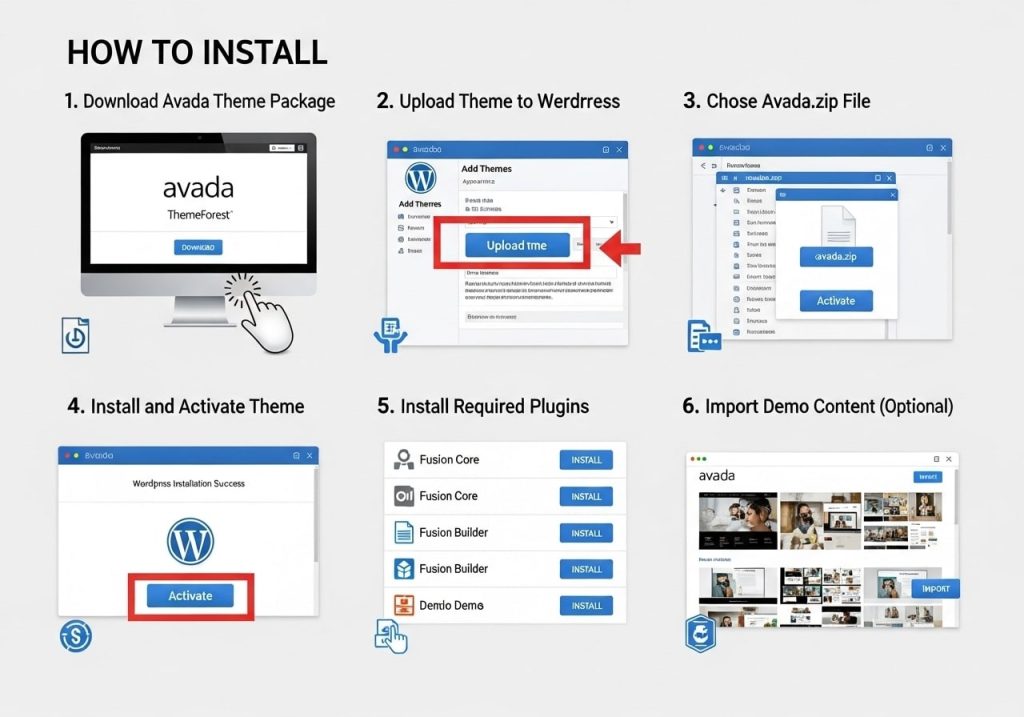
Learning how to install the Avada theme on WordPress is straightforward, but several methods depend on your setup.
Method 1: Upload via WordPress Dashboard
- Download the Theme: After purchasing from Avada Themeforest, download the theme files
- Access WordPress Admin: Log in to your WordPress dashboard
- Navigate to Themes: Go to Appearance > Themes
- Upload Theme: Click “Add New” then “Upload Theme.”
- Select File: Choose the Avada theme zip file
- Install and Activate: Complete the installation process
Method 2: FTP Upload
For users comfortable with FTP:
- Extract the Avada theme files
- Upload the “Avada” folder to /wp-content/themes/
- Activate through the WordPress dashboard
Method 3: Install Avada Theme WordPress via Hosting Panel
Many hosting providers offer one-click installations for popular themes like Avada.
Post-Installation Steps
After learning how to add the Avada theme to WordPress, complete these essential steps:
- Install required plugins (Fusion Builder, Fusion Core)
- Import demo content if desired
- Configure basic theme settings
- Set up your preferred layout options
Avada Theme Demo and Examples
Exploring Avada WordPress theme examples inspires and demonstrates the theme’s versatility. The Avada theme demo showcases various industries and design styles.
Popular Demo Categories
- Business and Corporate: Professional layouts suitable for consulting firms, agencies, and corporate websites. These demos emphasize clean design and trust-building elements.
- E-commerce: Avada website examples for online stores demonstrate WooCommerce integration and product showcase capabilities.
- Creative and Portfolio: Artist, photographer, and designer demos highlight visual storytelling and portfolio presentation features.
- Restaurant and Food: Specialized layouts for restaurants, cafes, and food businesses with menu displays and reservation systems.
WordPress Avada Theme Website Examples
Real-world implementations show the theme’s potential:
- Corporate consulting firms use clean, professional layouts
- Online stores leveraging advanced product display features
- Creative agencies showcasing portfolios with stunning visual effects
- Educational institutions presenting course information and resources
Customizing Your Avada WordPress Theme
Understanding how to customize the Avada theme in WordPress opens up endless possibilities for creating unique websites.
Global Options Panel
The theme’s Global Options panel provides centralized control over:
- Color schemes and styling
- Typography settings
- Layout configurations
- Header and footer options
- Social media integration
- SEO settings
How to Use Avada Theme in WordPress Effectively
- Page-Level Customization: Each page can have unique settings, overriding global options when needed. This flexibility allows for diverse page designs within the same website.
- Element Customization: Individual elements can be styled independently, providing granular control over appearance.
- Responsive Settings: Customize how elements appear on different device sizes, ensuring optimal mobile experiences.
Advanced Customization Techniques
- Custom CSS: Advanced users can add custom CSS for unique styling requirements.
- Hook System: Developers can use WordPress hooks to modify theme behavior without editing core files.
- Template Overrides: Create custom page templates for specific needs.
Avada Theme Documentation and Support
The Avada theme documentation is comprehensive and regularly updated, making it easier for users to master the theme’s capabilities.
Documentation Structure
- Getting Started Guide: Step-by-step instructions for new users, covering installation through basic setup.
- Feature Documentation: Detailed explanations of each theme feature, including screenshots and examples.
- Troubleshooting Section: Common issues and solutions, helping users resolve problems independently.
- Video Tutorials: The WordPress Avada tutorial collection includes video guides for visual learners.
Community Support
- Official Support: ThemeFusion provides ticket-based support for license holders.
- Community Forums: User community sharing tips, tricks, and solutions.
- Third-Party Resources: Many WordPress educators create WordPress Avada theme tutorial content.
Avada Theme Reddit Discussions
The Avada theme Reddit community provides peer-to-peer support and honest discussions about theme experiences.
Avada WordPress Theme Review: Pros and Cons
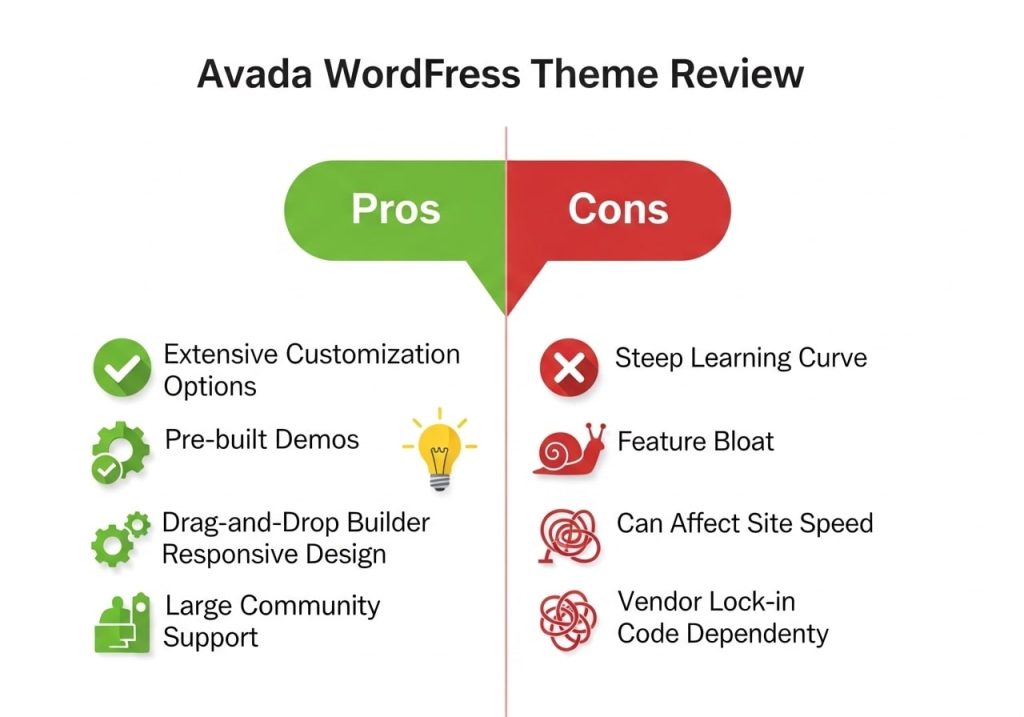
This Avada WordPress theme review examines both strengths and potential drawbacks to help you make an informed decision.
Advantages
- Versatility: The theme truly works for almost any website type, justifying its “multi-purpose” designation.
- Built-in Page Builder: Fusion Builder eliminates the need for additional page builder plugins.
- Regular Updates: Consistent updates ensure compatibility with the latest WordPress versions and security standards.
- Pre-built Templates: Avada prebuilt websites significantly reduce development time.
- Documentation Quality: Comprehensive guides make the learning curve manageable.
- WooCommerce Integration: Seamless e-commerce functionality for online stores.
Potential Drawbacks
- Learning Curve: The extensive feature set can overwhelm beginners initially.
- File Size: As a feature-rich theme, Avada has a larger footprint than simpler alternatives.
- Customization Complexity: Advanced customizations may require technical knowledge.
- Plugin Dependencies: Some features require additional plugins to function fully.
Is Avada a Good WordPress Theme?
The answer depends on your specific needs. Is Avada a good WordPress theme for beginners? Yes, thanks to its pre-built templates and documentation. For developers, it provides a solid foundation with customization flexibility.
Avada Theme WooCommerce Integration
The Avada theme WooCommerce integration is one of its strongest features, making it an excellent choice for e-commerce websites.
E-commerce Features
- Product Display Options: Multiple layouts for showcasing products, including grid, list, and carousel formats.
- Custom Shop Pages: Design unique shop layouts using Fusion Builder.
- Cart and Checkout Customization: Modify the shopping experience to match your brand.
- Product Page Layouts: Various template options for individual product pages.
Advanced E-commerce Functionality
- Wishlist Integration: Compatible with popular wishlist plugins.
- Quick View Options: Enable product quick view functionality.
- Advanced Filtering: Help customers find products with sophisticated filter options.
- Mobile Commerce: Optimized mobile shopping experiences.
Creating an Avada Child Theme
Setting up a WordPress Avada child theme protects customizations during theme updates.
Avada Child Theme WordPress Setup
- Create Child Theme Directory: In /wp-content/themes/, create a new folder (e.g., “avada-child”).
- Create style.css: Include proper header information and import parent styles.
- Create functions.php: Add custom functions and modifications.
- Activate Child Theme: Switch to the child theme in the WordPress dashboard.
Benefits of Using Child Themes
- Preserve customizations during updates
- Add custom functionality safely
- Experiment with modifications risk-free
- Maintain clean separation between theme and customizations
Updating Your Avada Theme
Understanding how to update the Avada theme in WordPress ensures you maintain the latest features and security patches.
Update Methods
Automatic Updates: Enable automatic updates through the theme options panel.
Manual Updates: Download new versions from ThemeForest and learn how to upload the Avada theme to the WordPress dashboard.
FTP Updates: Advanced users can update via FTP for faster deployment.
Pre-Update Checklist
- Backup your website completely
- Test updates on the staging environment first
- Document any customizations
- Verify child theme setup
- Check plugin compatibility
Avada Theme WordPress Version Compatibility
Each Avada theme WordPress version is tested for compatibility with current WordPress releases. The development team maintains backward compatibility while embracing new WordPress features.
Avada WordPress Theme Alternatives
While Avada remains popular, understanding alternatives helps make informed decisions.
Popular Competitors
- Divi by Elegant Themes: Another popular multi-purpose theme with a visual builder.
- BeTheme: Offers an extensive pre-built website collection.
- X Theme: Flexible framework with multiple design stacks.
- Flatsome: E-commerce focused theme with modern design.
When to Consider Alternatives
- Simpler websites may benefit from lighter themes
- Specific industry requirements might favor specialized themes
- Budget constraints might lead to different options
- Performance requirements may dictate theme choice
The Avada WordPress theme continues to evolve, maintaining its position as a leading choice for WordPress websites. Whether you’re building a simple business website or a complex e-commerce platform, understanding how to effectively use this powerful theme can significantly impact your project’s success.
From installation through advanced customization, the Avada responsive multi-purpose WordPress theme provides the tools and flexibility needed for modern web development. With proper setup, including WordPress Avada child theme implementation and regular updates, Avada can serve as a reliable foundation for virtually any website project.
Consider your specific requirements, technical comfort level, and long-term goals when evaluating whether Avada fits your needs. The theme’s extensive documentation, active community, and consistent updates make it a solid investment for serious website projects.