
Elements Kit – Ultimate Addon for Elementor
What is Elements Kit is one of the most popular Elementor addons that extends the functionality of the Elementor page builder. This powerful plugin adds over 90 custom widgets and extensions to your WordPress website, making it easier to create professional-looking pages without any coding knowledge.
Whether you’re building a business website, blog, or online store, Elements Kit provides the tools you need to design beautiful and functional web pages. The plugin works seamlessly with Elementor and offers both free and premium versions to suit different needs and budgets.
Elements Kit Premium Plugin WordPress
Get the Premium Elements Kit Plugin
Why Choose Elements Kit Over Other Elementor Addons?
Elements Kit stands out from other Elementor addons because it offers:
- Comprehensive widget collection: Over 90 widgets covering everything from basic elements to advanced features
- Regular updates: The development team constantly adds new features and improves existing ones
- Great support: Responsive customer support team that helps users solve problems quickly
- Affordable pricing: Competitive pricing compared to similar plugins in the market
- Easy to use: User-friendly interface that doesn’t require technical expertise
Elements Kit Free vs Elements Kit Pro
Understanding the difference between the free and pro versions of Elements Kit helps you make the right choice for your website needs.
Elements Kit Free Features
The free version of Elements Kit includes:
- 40+ widgets: Essential widgets like team members, testimonials, pricing tables, and more
- Header and footer builder: Create custom headers and footers for your website
- Mega menu: Build dropdown menus with multiple columns and custom content
- Basic templates: Access to starter templates for quick website setup
- Regular updates: Get new features and bug fixes through WordPress updates
Elements Kit Pro Features
Elements Kit Pro expands your options with:
- 90+ widgets: Complete access to all available widgets and extensions
- Advanced form builder: Create complex forms with conditional logic and multiple field types
- WooCommerce widgets: Special widgets designed for online stores
- Advanced animations: More animation options and effects for your content
- Premium templates: Professional templates designed for various industries
- Priority support: Faster response times and dedicated support channels
- White label options: Remove branding for client projects
Key Features and Benefits
Elements Kit offers numerous features that make website building faster and more enjoyable. Here are the most important ones:
Widget Collection
The plugin includes widgets for almost every website need:
- Content widgets: Post lists, testimonials, team members, pricing tables
- Marketing widgets: Call-to-action buttons, countdown timers, progress bars
- Media widgets: Image galleries, video players, audio players
- E-commerce widgets: Product grids, shopping carts, checkout forms
- Social widgets: Social media feeds, share buttons, social profiles
Header and Footer Builder
Creating custom headers and footers becomes simple with Elements Kit. You can:
- Design headers that match your brand perfectly
- Add shopping carts, search boxes, and navigation menus
- Create sticky headers that stay visible while scrolling
- Build footer sections with contact information and social links
Mega Menu System
The mega menu feature allows you to create advanced navigation systems:
- Multi-column dropdown menus
- Add images and icons to menu items
- Include widgets inside menu dropdowns
- Mobile-responsive menu designs
Elements Kit Templates and Examples

One of the best ways to get started with Elements Kit is by exploring the available templates and examples. These pre-designed layouts save time and provide inspiration for your own projects.
Template Categories
Elements Kit templates cover various website types:
- Business websites: Corporate layouts with professional designs
- Creative portfolios: Showcase your work with stunning gallery layouts
- Online stores: E-commerce templates optimized for selling products
- Blogs and magazines: Content-focused designs for publishers
- Landing pages: High-converting pages for marketing campaigns
How to Use Templates
Using Elements Kit templates is straightforward:
- Browse the template library: Look through available options in your dashboard
- Preview templates: See how each template looks before importing
- Import chosen templates: One-click import brings the complete design to your site
- Customize content: Replace placeholder text and images with your own content
- Publish your pages: Make your new pages live for visitors to see
Elements Kit Examples in Action
Many successful websites use Elements Kit to create impressive designs. Common examples include:
- Restaurant websites: Menus, reservation forms, and photo galleries
- Fitness centers: Class schedules, trainer profiles, and membership pricing
- Real estate agencies: Property listings, agent profiles, and contact forms
- Educational institutions: Course catalogs, faculty pages, and event calendars
How to Download and Install Elements Kit
Getting Elements Kit set up on your website is a simple process that takes just a few minutes.
Elements Kit Download Process
For the free version:
- Visit WordPress plugin directory: Search for “Elements Kit” in your WordPress admin
- Install directly: Click “Install Now” and then “Activate”
- Start using widgets: Access new widgets in your Elementor editor immediately
For Elements Kit Pro:
- Purchase from official website: Buy your license from the Elements Kit website
- Download the plugin file: Get the premium plugin file from your account
- Upload to WordPress: Install the plugin file through your WordPress admin
- Enter license key: Activate your license to receive updates and support
Installation Requirements
Before installing Elements Kit, make sure your website meets these requirements:
- WordPress version: 4.0 or higher
- Elementor plugin: Must be installed and activated
- PHP version: 7.0 or higher recommended
- Memory limit: At least 256MB for optimal performance
Elements Kit Free Download Safety
Always download Elements Kit from official sources to ensure security:
- WordPress.org: The official plugin repository for the free version
- Elements Kit website: The only legitimate source for the pro version
- Avoid unofficial sites: Don’t download from random websites or forums
Elements Kit Readymag Integration
Elements Kit Readymag represents the template and design showcase features within the plugin. This system helps users discover and implement professional designs quickly.
Understanding Readymag Features
The Readymag system includes:
- Template browser: Easy-to-navigate interface for finding templates
- Category filters: Sort templates by industry, style, or purpose
- Preview system: See how templates look before installing them
- One-click import: Simple installation process for chosen templates
Benefits of Using Readymag Templates
Using these ready-made designs offers several advantages:
- Save development time: Skip the design phase and start with professional layouts
- Learn design principles: Study how professional designers structure pages
- Maintain consistency: Use templates from the same collection for unified branding
- Mobile optimization: All templates work perfectly on mobile devices
Best Elements Kit Elementor Addons
Elements Kit includes many powerful addons that extend Elementor’s capabilities. Here are the most popular and useful ones:
Content Creation Addons
These widgets help you create engaging content:
- Advanced testimonials: Display customer reviews with photos and ratings
- Team member profiles: Showcase your staff with social links and descriptions
- Timeline widget: Create chronological displays of events or processes
- FAQ sections: Organize frequently asked questions in collapsible format
Marketing and Conversion Addons
Boost your marketing efforts with these tools:
- Pricing tables: Compare different service packages or product options
- Call-to-action buttons: Eye-catching buttons that drive user actions
- Countdown timers: Create urgency for sales or event promotions
- Progress bars: Show statistics or completion percentages visually
E-commerce Addons
For online stores, Elements Kit provides:
- Product carousels: Showcase products in rotating displays
- Shopping cart widgets: Custom cart designs for better user experience
- Wishlist functionality: Let customers save products for later
- Product comparison tools: Help customers compare different options
Form and Interaction Addons
Improve user engagement with:
- Advanced contact forms: Multi-step forms with conditional logic
- Image hotspots: Interactive images with clickable information points
- Modal popups: Display additional information without leaving the page
- Tab and accordion widgets: Organize content in space-saving layouts
Pricing and Plans
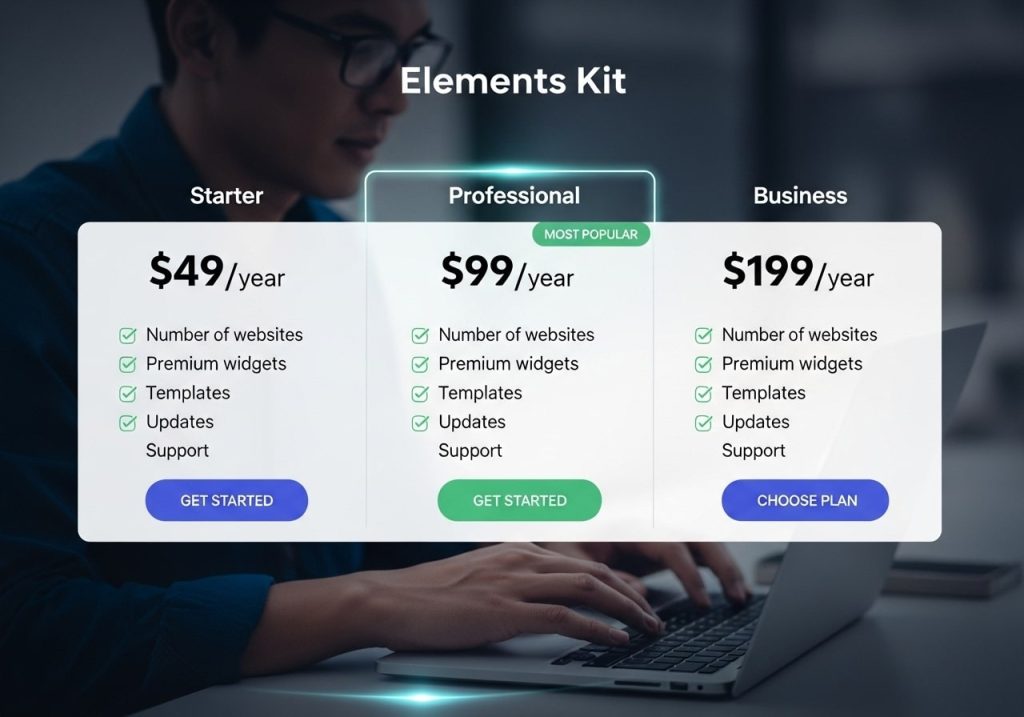
Understanding Elements Kit pricing helps you choose the right plan for your needs and budget.
Free Version Limitations
The free version is perfect for:
- Small websites: Personal blogs or simple business sites
- Testing purposes: Try the plugin before upgrading to pro
- Limited budgets: Get professional features without spending money
- Learning projects: Practice with Elementor and Elements Kit features
Pro Version Value
Elements Kit Pro offers excellent value because:
- Annual license: One payment covers a full year of updates and support
- Multiple site options: Use on several websites depending on your plan
- Regular feature additions: New widgets and features added regularly
- Priority support: Faster response times when you need help
Choosing the Right Plan
Consider these factors when selecting a plan:
- Number of websites: How many sites will use the plugin?
- Required features: Do you need all pro widgets or just a few?
- Support needs: How important is priority support for your projects?
- Budget constraints: What can you afford to spend annually?
Getting Started with Elements Kit
Once you’ve installed Elements Kit, follow these steps to start creating better websites:
Initial Setup
- Activate the plugin: Make sure both Elementor and Elements Kit are active
- Explore widget options: Check out new widgets in the Elementor editor
- Review template library: Browse available templates for inspiration
- Configure basic settings: Set up any global options or preferences
Creating Your First Page
Start with a simple project:
- Choose a template: Pick a template that matches your needs
- Import the design: Use one-click import to add it to your site
- Customize content: Replace placeholder text and images
- Adjust styling: Modify colors, fonts, and spacing to match your brand
- Test responsiveness: Check how the page looks on different devices
Best Practices for Elements Kit
Follow these tips for better results:
- Start simple: Don’t try to use every widget at once
- Keep it consistent: Use similar styling across all pages
- Optimize for speed: Don’t overload pages with too many heavy widgets
- Test regularly: Check your pages on different browsers and devices
- Keep backups: Always backup your site before making major changes
Common Issues and Solutions
Even with a user-friendly plugin like Elements Kit, you might encounter some challenges. Here are common problems and their solutions:
Installation Problems
Issue: Plugin won’t install or activate
Solutions:
- Check WordPress and Elementor versions
- Increase PHP memory limit
- Deactivate conflicting plugins temporarily
- Contact your hosting provider for server-related issues
Widget Display Issues
Issue: Widgets don’t appear or look broken
Solutions:
- Clear browser and caching plugin caches
- Update Elementor and Elements Kit to latest versions
- Check for theme conflicts by switching to a default theme temporarily
- Regenerate CSS in Elementor settings
Performance Concerns
Issue: Website loads slowly after installing Elements Kit
Solutions:
- Disable unused widgets in Elements Kit settings
- Optimize images and use appropriate file formats
- Use a good caching plugin
- Choose a reliable hosting provider
License and Update Problems
Issue: Pro features not working or updates failing
Solutions:
- Verify your license key is entered correctly
- Check license hasn’t expired
- Ensure you’re downloading from the official website
- Contact support if license issues persist
Elements Kit transforms the way you build websites with Elementor by providing powerful tools and beautiful templates that save time and improve results. Whether you choose the free version or invest in Elements Kit Pro, you’ll have access to professional-grade features that make website creation easier and more enjoyable. Start with the free version today to experience how Elements Kit can improve your website building workflow, and consider upgrading to pro when you need advanced features and priority support.
Ready to enhance your website? Download Elements Kit now and start creating better web pages with professional widgets and stunning templates that will impress your visitors and help grow your business.